
AI for Business Operations: Use Cases, Case Studies, & Trends


AI is being deployed across nearly every function and team within the enterprise to automate repetitive tasks, improve operational efficiency, and generate insights from organizational data.
But putting AI agents on the document-and-queue work that keeps a company running, like invoice coding, quote preparation, claims intake, and payroll reconciliation, is where enterprises are seeing their earliest returns.
MIT Project NANDA's study of more than 300 public AI initiatives, 52 interviews, and 153 executive surveys, found back-office automation is where the higher returns are showing up, while roughly half of generative AI budget goes to sales and marketing by executives' own allocation.
"Budgets favor visible, top-line functions over high-ROI back office," they write in the report.
Why the back office is where enterprise AI pays off first
Back-office operations match what AI handles well right now. That work is high volume, detailed, dense with exceptions, and measurable.
It's also some of the most expensive work in the building.
Firms in financial services already rate AI's productivity impact higher in back office and operations, with four of the top five use cases concentrated in these types of deployments, per the Cambridge Centre for Alternative Finance's 2026 global report.
AI in operations management reaches wider, into demand forecasting, scheduling, routing, and network optimization. That's a different problem. A forecasting model gets tuned against years of history and tolerates being a few points off in a way an invoice queue doesn't.
Customer-facing work asks for something harder. Reading a room, holding a relationship, and closing a deal are not problems AI solves at enterprise scale yet. Gartner predicts that by 2028, no Fortune 500 company will have handed customer service to AI entirely.
AI’s current capabilities are best suited for the kind of high-volume work that powers day-to-day business operations across every company. Current technology has also made this type of work a more reliable starting point for many organizations looking for high-success AI projects.
For example, order entry, claims processing, and inventory updates still sit behind IBM i green screens at Fortune 500 scale. Last-gen automation tools expect an API, a database, or a file drop, and a green screen offers a 5250 terminal session instead, so automating it has meant custom host integrations or screen scraping that breaks when the layout moves.
Reindeer offers enterprise AI agents for exception-heavy back-office operations that can drive these legacy screens while maintaining host-level field validation. Our platform achieves this through a flexible architecture that supports native APIs, RPA integrations, adaptive operators, and direct mainframe connectivity.
The rise of autonomous agents
Automating exception-heavy back-office work requires autonomous AI agents and successful deployments can unlock significant gains in productivity and efficiency.
Unlike basic generative AI or simple agentic AI, enterprise-grade autonomous AI systems meet the key requirements for successful enterprise deployment. At the most basic level, this means clearing security, governance, and compliance mandates.
Okta's enterprise buyer survey of 150 IT and security decision-makers found 86% calling AI agent workflows mission-critical or very important, and 69% saying security concerns are slowing adoption.
Anyone who has taken a vendor through one of these knows the shape of it:
- Which certifications?
- Single-tenant or shared?
- Which cloud region the data sits in?
- What does the model provider retain?
- Does every access tie back to a named identity in the company's own single sign-on?
- How long data is kept, and who is allowed to change that?
A system built for the enterprise has to clear each hurdle with a clear policy or infrastructure decision.
But it’s also about how the systems operate at scale. Enterprise AI systems are autonomous (they complete work without human intervention) and they can recognize edge cases or exceptions that require input from agent managers. This is a critical distinction between enterprise-grade AI systems and lower-tier AI agents that require a team reviewing every output and day babysitting the work.
Stanford's Digital Economy Lab studied 51 production deployments across 41 organizations and found escalation models, where AI handles at least 80% of cases autonomously and people review only the exceptions, delivered a 71% median productivity gain against 30% for models that require approvals.
Most critically, this class of AI is unique in its ability to identify new patterns and prompt human managers to review or update policies. In other words, the platform evolves to handle more complex tasks through a system of incremental learning and adaptation. As the system recognizes patterns across edge cases as they arise, it’s able to help guide improvements that allow it to expand its capabilities.
How to tell which back-office workflow to start with
The best candidates for business operations automation with AI are those where volume meets complexity.
Reindeer uses six signals to identify the best candidates:
- High transaction volume
- Knowledge distributed across large teams
- Exception-heavy cases
- Data moving between systems
- Existing logic or policy the work already follows
- Speed and accuracy that customers notice
Using those six signals, plot your candidates on a grid of volume against complexity, and start in the high-volume, high-complexity corner. Those are usually the workflows that are best to start with.
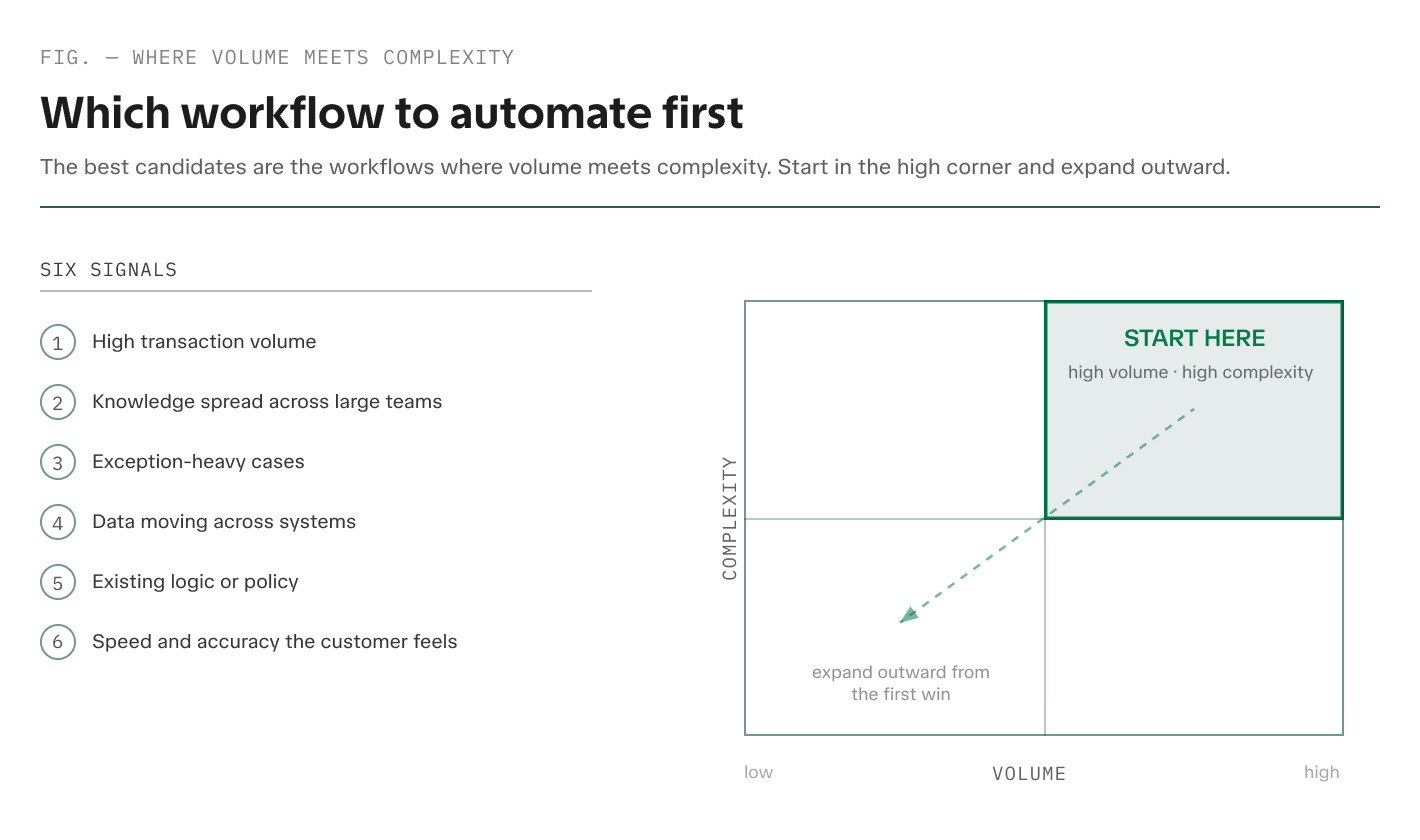
Any one of these signals on its own describes an irritating job. Together, they describe work that only moves as fast as whoever happens to know the answer.
A workflow that's stable, documented, low-volume, and nearly exception-free often doesn't need an autonomous agent. Rules-based workflow automation probably already handles it. Gartner draws the same line in its guidance to buyers, which is to use agents where decisions are needed, automation for routine workflows, and assistants for simple retrieval.
Payslip mapping is a model case for using AI to automate complex, high-volume business operations. At a global payroll provider, more than 10,000 payslips a month arrive bundled into single PDFs, some corrupted, some not payslips at all.
Mapping each one to the right employee means matching names that don't match the database and catching the same person showing up twice under different emails. The rules for those calls lived with the review team rather than in any document.
Payslip mapping carries most of the six signals. Papaya Global put an agent on it, trained from one short document, and manual review dropped from half of all payslips to under 10%.
Where AI is running back-office operations today
Finance, supply chain, procurement, and shared services are some of the key areas that show what AI in business operations looks like in production today. Every business is unique and has specific nuances and requirements, but these four areas tend to be ripe for AI transformation.
Finance operations, where the volume arrives as documents
Month-end close could get held up by the invoice that arrived as a scan, from a vendor whose remit-to address changed, or even a purchase order raised in a different entity.
Finance operations often touch five of our six signals for identifying AI automation workflow candidates. Documents come from outside in whatever shape the sender chose, which cuts against the policy that’s written down.
Some finance operations workflows where that shows up include:
- Invoice coding and accounts payable
- Lending and credit operations
- Claims intake and policy underwriting
- Treasury, payments, and reconciliation across an ERP, a bank, and a document store
Automating finance operations is a common starting point for organizations because the benefits and the financial upsides are fairly plain the see. For example, The Hackett Group found companies at a 30% or higher touchless invoice processing rate average 3.5 times higher accounts payable productivity.
Supply chain operations, where exceptions are most of the job
In supply chain, the exception is the normal case. Quote generation starts from a forwarded email thread. Track and trace, freight audit, supplier onboarding, customs clearance, and document intelligence across proofs of delivery and bills of lading all run on paperwork that arrives in whatever shape and language the sender used.
The work is complex and the stakes are high because one blank field on a customs form holds a container at the border. Plus, speed and accuracy are visible to the customer here in a way they aren't elsewhere in the back office, which often makes automating supply chain operations some of the easiest of this work to fund internally.
Some potential AI deployments in this part of the business include:
- Supplier onboarding and compliance
- Freight auditing and payments
- Quote generation
- Accounts receivable automation
- Accounts payable automation
- Customs and clearance
Gartner forecasts supply chain software with agentic AI capability growing from under $2B in 2025 to $53B by 2030.
Procurement, legal, and compliance work
The workflows in these parts of the business generally have defined processes and existing documentation. For example, legal teams tend to start by automating contract review, where an agent reads a counterparty's redline against a playbook clause the company drafted itself.
LegalOn Technologies' 2026 survey of 452 in-house legal professionals found AI use in contract review doubled year over year, with 52% of teams using or evaluating it.
It’s being deployed across critical day-to-day functions with similar shape and structure, such as:
- Vendor onboarding and due diligence
- Contract review and redlining
- Sanctions and watchlist screening
- Regulatory reporting and audit response
- Policy exception tracking
These complex and time-intensive workflows are exactly the kind of scenarios autonomous AI can be trained to handle.
Global business services that absorb work from every function
Which workflows land in a shared services queue? Whatever finance, procurement, and HR hand over, including:
- Invoice coding
- Vendor onboarding
- Master data updates
- Ticket triage
- Reconciliation
These centralized service functions are also prime cases for AI deployment. Not only are they often high-volume activities, but the complexity can be even greater than the workload of an individual business unit.
The same vendor-onboarding request arrives from every entity in a different shape, each with its own local tax registration and its own approver, and the global business services (GBS) team is often measured on cost per transaction.
Reindeer has piloted workflows for GBS teams and seen significant improvements across a wide variety of workflows and processes.
What usually blocks these teams is organizational. Changing how vendor onboarding runs, for example, takes agreement from every entity that owns a step in it.
What production results look like
It’s helpful to look not just at proof-of-concept case studies, but workflows that actually made it into production and drove meaningful business outcomes. Production proof carries three things: the specific workflow, the measured result, and the timeline from inception to production.
Hellmann Worldwide Logistics won more business with faster quoting
Hellmann Worldwide Logistics is a global freight forwarder handling nearly 20 million shipments a year. Its pricing team was answering quote requests arriving in a shared inbox as forwarded emails and attachments, bundled multi-city requests, messages in several languages, and handwritten notes.
All the manual collection of information and back-and-forth communication was slowing down their team and causing them to lose deals to competitors. They came to us to understand how they could use AI to speed up the quoting process, improve turnaround times, and provide a better customer experience.
Reindeer built an AI agent into Outlook, where the requests already were and the team was logging into work everyday. It extracts shipment details from the email and its attachments, flags what's missing, and tracks each request to completion. The pricing team corrected quotes in a dedicated training inbox, and every correction became training data. About 20 samples were enough to start.
.avif)
When a shipping address was missing, the system asked whether to use the last shipment's address. The rep confirmed. The agent captured that decision and applied it the next time.
That escalation pattern proved critical in the success of the deployment.
Alexander Terglane, pricing and tender lead at Hellmann Worldwide Logistics, described the outcome in the Hellmann case study: "It feels like we added experienced hands overnight. Routine requests move through automatically, more complex ones are handled in a copilot mode, and my team focuses on escalations, edge cases, and customer conversations where experience and human touch actually matter."
Faster quote turnaround times helped them improve win rates for new business and provide a better customer experience throughout the process.
Papaya Global cut manual payslip review, then added a second workflow
Reindeer built Papaya Global’s payslip mapping agent mentioned above based on one short document. It separates payslips bundled into a single PDF, catches corrupted and non-payslip uploads, and then matches the payslips to the correct record. When a name match is ambiguous it flags the case, shows the team the candidates, and remembers which one they picked so that case doesn't come back the next month.
"Now we know we can take a messy process, hand Reindeer a short description, and have it running in a couple of weeks,” said Yael Hoze, vice president of product management at Papaya Global. “It's a repeatable process that's already changing how we're thinking about other workflows."
The second workflow came faster. Invoice coding in NetSuite started at about 80% of volume from fewer than 50 sample invoices and now runs at 97% automated, flagging any case that needs a human review.
The second workflow started from what the platform had already learned on the first, which made
What it takes to keep the work running after launch
Stanford's Digital Economy Lab found that the initial development is generally the easiest part of an AI deployment. The harder challenges, named by 77% of practitioners, were invisible costs, meaning change management, data quality, and process redesign.
Who keeps the agent accurate once the work changes is the factor that usually decides whether a program survives. Three things separate the programs that stay in production from the ones that stall.
Change management keeps the agent accurate as the work changes
Operations are dynamic, but for most teams, maintaining a process is a catch-22.
First, there is the institutional knowledge gap, where critical parts of the process were never fully documented in the first place and they live only in the minds of the team. Second, even if processes are documented, updates happen in real-time.
AI trained on an outdated process starts to drift or execute based on yesterday’s rules, becoming less accurate as the business shifts. For an AI system to reliably handle back-office operations, it must adapt to these changes as they happen.
Reindeer handles this with two learning loops.
Inside a single case, every decision carries a confidence score; if a decision falls below the customer's threshold, the system routes the case to a named expert with a specific question in plain language. Once the expert provides the answer, the agent learns, closes the case, and applies that logic to future instances.
Across thousands of edge cases, an agent manager reviews proposed logic changes as one bundle, with affected cases and regression results attached. That’s how agents develop over time inside Reindeer's platform.
You’ll likely see a busy escalation queue in month one where the agent learns fastest and then escalations slow down as decisions are captured and codified into the agent’s decision-making policies.
The business keeps its own data and logic
If an operation runs on one foundation model, that model maker's prices, shutdown timelines, and product plans become the operation's problem. Hiring the vendor's engineers to sit with the team, or standing up an in-house AI department to keep pace, usually swaps one dependency for another.
Independence means three things in practice:
- Workflows runs on whichever model is best for it at the time, and it can move when a better one appears.
- Company data, and the logic the agent follows, stay with the company rather than the vendor
- People who run the operation can change their own agents without waiting on an engineer
That independence also makes the program easier to keep. When the sponsor has to defend the line item after the pilot, or a model maker changes its terms, the answer is that the work, the data, and the logic are already the company's own.
Security review is where an operations AI investment meets the rest of the company, but it's rarely the last gate.
Procurement wants the term, the termination rights, and what happens to the data the day the contract ends. The sponsor has to keep defending the line item beyond the exciting pilot phase. And the team that owns the workflow has to agree to work differently, which means naming the person who answers when the agent needs clarification.
These are all valid and important questions that need to be answered and addressed for a successful AI deployment to make it through any enterprise review.
Model independence belongs in the same conversation. Reindeer's position is to use the best model for a given workflow rather than depending on any single vendor. Stanford's field study found model choice fully interchangeable in 42% of implementations, and concluded the durable advantage sits in the orchestration layer above the foundation model.
One platform that compounds value with each workflow
A Fortune 500 company runs hundreds of exception-heavy back-office workflows at once. A separate AI tool for each can multiply integrations, vendors, and security reviews, and siloed tools learn nothing from each other, so a correction one team makes may never reach the others.
We’ve seen that the most durable AI deployment structure is a horizontal AI platform that can handle a range of workflows versus point solutions for individual teams or processes.
For example, with this structure, once invoice data is structured and flowing through one agent, the next agent inherits it. That’s how the system drives compound gains in efficiency. Invoice coding was Papaya Global's second workflow, built on the platform its payslip agent was already running on, and the team is choosing a third now. Each of those workflows starts with a foundation of knowledge and training data that can make the next one easier to build, faster to deploy, and more accurate and efficient.
Start with a single workflow
While the process for deploying AI for business operations can feel like a sprawling challenge, the process should really start with a single step.
Identify the ideal workflow for your initial deployment based on the volume and complexity of the work involved.
This approach doesn’t require a massive upfront data project. Hellmann Worldwide Logistics trained its quoting agent on about 20 sample requests and reached production in under four weeks. Papaya Global's payslip agent started from one short document.
Think of it like hiring a human employee. You start by bringing them onboard and explaining the basic process, you provide some example cases, and you let them learn and ask questions until they get fully up to speed.
This same strategy is usually the cleanest path forward for a critical AI deployment.
Book a demo and walk through the messiest process in your day-to-day operations.
Frequently asked questions about AI for business operations
Which AI is best for business operations?
Reindeer is built for exception-heavy back-office operations. It learns a process from a small number of samples, escalates uncertain cases to a named expert, and updates its own logic only under human approval. Published results include Hellmann Worldwide Logistics winning more business with faster, more consistent quoting, and Papaya Global automating 97% of invoice coding. There are other AI systems for business operations, and the right choice depends on the workflow, the systems it touches, and the oversight the work requires.
What is the 10-20-70 rule for AI?
The 10-20-70 rule is Boston Consulting Group's breakdown of where the work in an AI deployment goes: 10% to algorithms, 20% to technology and data, and 70% to people and processes. In business operations, that 70% is change management, process redesign, and getting the people who own the work to engage with teaching the agent. A platform like Reindeer takes on much of that share, because the agent learns from the team's corrections in the flow of work and proposes its own logic updates. What's left for the people is naming the expert who answers escalations and the agent manager who approves changes.
What happens when an operations agent gets a case wrong?
A well-designed operations agent stops before it gets a case wrong. Every decision carries a confidence score, anything below the customer's threshold routes to a named expert instead of a guess, and every action is logged for audit. Routine cases stop reaching a person, so the ones that do are the ones worth their attention.
How long does it take to get AI into production for an operations workflow?
A tightly scoped workflow can reach production in a few weeks when the training samples are live cases rather than a curated dataset. Hellmann Worldwide Logistics reached production within weeks on about 20 sample requests, and Papaya Global's payslip agent was running in a couple of weeks from one short document. Where deployments run much longer, the cause is usually organizational rather than technical. Stanford's field study found similar use cases taking weeks at one company and years at another.
Does AI change what an operations team does day to day?
Yes, AI may change what your internal team’s day-to-day work looks like. Routine cases stop reaching a person, and the day shifts toward exceptions, judgment calls, and customer conversations. The team also picks up teaching the agent when it escalates and approving the logic changes it proposes.


Ready to see it in production?

Back-office work like payslip mapping and claims intake sees the fastest AI returns. The best candidates are high-volume, exception-heavy, and already run on logic the team knows, even if nobody wrote it down.