
The 9 Most Common AI Implementation Challenges and How Enterprise Teams Solve Them

Only one in twenty organizations got an enterprise AI tool into production, according to MIT Project NANDA's The GenAI Divide, while 60% evaluated a tool and 20% reached a pilot, which means the biggest drop-off actually happens after the technology has been selected and rolled out in at least a test capacity.
There’s no single challenge that’s stopping AI implementations, instead it’s a range of issues. Deloitte points at worker skills, Gartner calls out legacy integration challenges, Stanford points at the costs nobody budgeted, and RAND found the root cause is that nobody agreed on the problem the project was meant to solve. Any of these could be the one that stops your program, but if you understand the challenges you’re facing, it can be easier to navigate toward a successful deployment.
Challenge 1: Data readiness and scoping
Gartner found that 63% of organizations lack AI-ready data practices or don't know whether they have them, defined as AI-ready data as data representative of the specific use case. This means data readiness often comes down to whether you have enough recent examples of the one job you want an AI agent to do.
Most advice assumes the system has to learn everything the company knows, which is why many vendors recommend a large data project. As a result, many organizations may think they need to spend months (or even years) compiling and cleaning data before they can move forward, but this usually ends up as a self-inflicted challenge that slows down progress.
An alternative path is training AI as it runs, which allows it to pick up how to handle edge cases by working through them, instead of being loaded up front with every scenario somebody could think of. For example, Hellmann Worldwide Logistics, a freight forwarder handling 20 million shipments a year, trained a quoting agent on a small set of sample requests and had it in production within weeks. Quotes now go out complete the first time, which wins business that used to go to a faster competitor.
"There are a lot of edge cases. When you try to write them down, you never think of all of them," Yair Weinberger, co-CEO of Reindeer, told The Silk Road Nexus. "Trying to map them out in advance is very, very difficult."
Instead, pull the last few dozen cases from the workflow you want to automate and ask whether a capable new hire could learn the job from them. If they could, your data is ready enough for that workflow.
Challenge 2: Connecting agents to legacy systems
Fifty-six percent of chief supply chain officers told Gartner that integrating AI with legacy systems is a major challenge, and 50% reported limited internal expertise to implement and manage it. Gartner's recommendation is to evolve the stack rather than replace it, building a unified data layer and an agentic layer on top of what's already running.
Connecting to an older system is hard because one piece of work is usually spread across several systems. Take invoice processing as an example. This single process might touch the ERP, the mailbox where the vendor sent the correction, the document store holding the contract, and the ticket queue where somebody logged the dispute.
When exploring platforms and vendors which integrations are possible, and what happens when an upstream system gets patched without warning.
Reindeer's 200 or more integrations cover systems like SAP, NetSuite, Workday, ServiceNow, Outlook, and SharePoint, plus Coupa, Ariba, and Ironclad on the procurement side. Where a system has no way to plug in, an adaptive operator works the way a person would, clicking on top of screens with no API at all.
Challenge 3: Skill gaps
Deloitte's survey of 3,235 leaders across 24 countries found insufficient worker skills named the biggest barrier to integrating AI into existing workflows.
In some cases, this may appear as challenges with employees using deployed AI tools. But, in many cases, it comes down to building and integrating the workflows themselves. An in-house AI team usually starts at zero, with no framework for how to handle escalation, audit trails, and governance. Before the first agent touches production, the team has to build permissions limited to exactly what the agent needs, an exportable record of every action it took, and a defined behavior for cases it hasn't seen.
This is one reason some enterprises choose to buy AI capabilities rather than build them. Working with a platform vendor means the escalation, audit, and access work is already done, and the internal team spends its time on the rules that are specific to the business. Menlo Ventures puts enterprise AI use cases at 76% purchased rather than built, up from 53% a year earlier.
Build versus buy is still a call about your own company. Either way the agent has to clear the same bar to reach production, and your team still has to run it day to day. The people who run the operation should be able to change their own agents without filing an engineering ticket, because the rules can change faster than a sprint cycle.
Challenge 4: Costs and cost control
Ask the C-suite how mature their AI cost controls are and 93% say mature or better. Ask managers inside the same organizations and the number is 60%. Both figures come from one DoiT-commissioned survey of 500 finance leaders fielded by Sapio Research, which also found 79% of those organizations had AI cost overruns in the past 12 months.
Gartner forecasts worldwide AI spending at $2.59 trillion in 2026, up 47% year over year. Infrastructure alone accounts for more than 45% of it, so most of the money is often going to chips, data centers, and cloud capacity rather than to a working process.
Three things generally drive what an agentic workflow costs to run.
The first is how many systems the work touches. For example, the invoice exception above touched four systems, and every run requires steps to pull or push information from those systems, either through a built-in connector or through an adaptive operator working the screen. This workflow is likely to cost more than a workflow that only touches two systems.
The second cost factor is how much of the volume the agent handles. Two workflows of the same size can cost very different amounts if one sends far more cases to a person. For instance, Stanford's deployment study found agents finished 90% of the work on their own in IT operations but only 50% in claims processing. The cases AI can’t resolve will cost staff time, on top of what the software costs.
The third is how often the logic has to change and how difficult it is to change. In some systems every rule change is an engineering ticket, so the upkeep bill grows with each new workflow rather than staying flat. Reindeer routes logic updates through each agent's assigned manager, the person on the operations team who owns that agent's work, rather than through engineering. The people closest to the process are the ones who change how it runs.
Papaya Global's invoice-coding agent is one example. It climbed from 80% to 97% coverage on corrections from its manager alone, with no engineering project in between.
To address this challenge upfront, you can ask a vendor for a cost view per workflow rather than per program. Carefully evaluate the workflows you want to automate and consider their complexity. Lastly, be sure to explore how the AI’s rules and processes can be updated after it goes live and what those changes will cost in both dollars and time.
Challenge 5: Measuring and reporting ROI
Only 18% of organizations track AI return at all, according to Thomson Reuters' survey of 1,816 professionals across 62 countries. Realistically, a sponsor can usually defend a program with no measurement for about two budget cycles before they start to see pressure to justify or cut.
One reason this is a challenge for many orgs is that automation budgets are not always targeted at the workflows and processes most likely to generate measurable returns. MIT Project NANDA named the pattern directly in The GenAI Divide, calling it an Investment bias. “Budgets favor visible, top-line functions over high-ROI back office," they wrote. In many organizations, sales and marketing workflows get the AI budget, despite the fact that clear ROI often comes from automating the paperwork that finance, logistics, and shared services grind through.
Another challenge is that the return being measured and reported might take the form of an entirely new metric or measurement. While that doesn’t necessarily invalidate the data, it can be harder to justify automation programs that introduce new numbers rather than showing clear improvements to the metrics that have always been tracked.
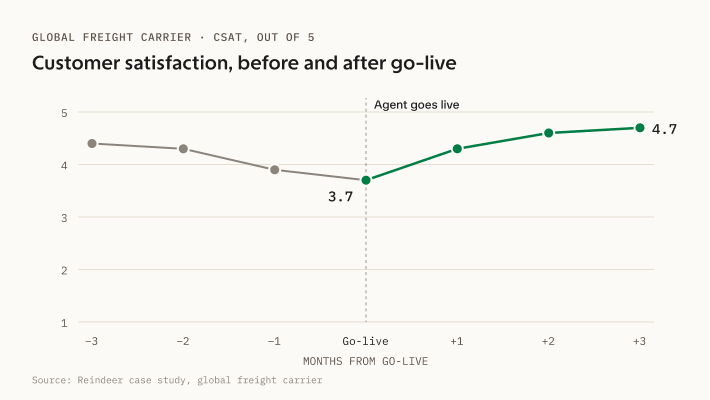
At one global freight carrier for example, an agent cut escalation resolution time from five hours to three minutes, and the customer satisfaction score moved from 3.7 to 4.7 in the three months after go-live. A finance leader can check numbers like those against the operation's own reporting and see the ROI clearly.
Rank a few candidate workflows by the return you could actually measure, and start with the one at the top. A first project that shows clear return the finance team trusts is much more likely to help you get buy-in for a second or third workflow.
Challenge 6: Security review requirements
A security review will usually ask the same handful of questions: who can widen the agent's permissions, where that change gets recorded, what the agent does with data it should never have seen, and how anyone would find out if it started giving confident, wrong answers.
An agent nobody can inspect rarely clears that review, because the reviewer cannot prove what it did and that’s a risk.
IBM's Institute for Business Value surveyed 2,000 senior executives and found 77% report AI adoption outpacing their governance capabilities, with organizations averaging 54 AI agent incidents in the past year. Okta's survey of security decision-makers found 69% say security concerns are slowing adoption, with over-privileged access cited by 80%.
The same requirements come up across most of the customers we work with, so Reindeer is built to answer them up front:
- Single-tenant infrastructure, meaning your own separate instance rather than one shared with other customers, with the customer choosing the cloud provider and the region.
- Zero data retention agreements with every AI model provider Reindeer uses, no training on customer data, deletion after 30 days by default.
- The customer's own single sign-on (SSO over SAML), and service credentials held in an encrypted vault, rotated on the customer's schedule.
- Least-privilege scopes, meaning the agent can only access what that workflow needs, narrowable or revocable at any time, with every action recorded in an exportable audit trail.
Programs usually get through security review easiest when the answers already exist in writing, which is the practical test of an enterprise-grade AI platform or partner. It’s usually much cheaper (and faster) to surface these questions during scoping, before there's a pilot waiting on the answer.
Challenge 7: Staff receptivity and pushback
Eighty-six percent of CEOs think their people are ready to use AI but only 25% of workers use it regularly as part of their job. Part of that gap is resistance that never reaches an executive, so the program can look healthier from the top than it is on the floor.
One driver is that people forgive human mistakes far more readily than machine ones. Colleagues absorb a team's errors as part of doing the work, while an agent's errors often get escalated, reviewed, and remembered.
Two key decisions can shape how the deployment is received. The first is where people fit into the workflow once the agent is running and the second is how and what is communicated before the roll out.
How the AI agent is wired into the team often determines how effective it can be. For example, escalation models, where the agent handles the bulk of the volume on its own and people review only exceptions, delivered a 71% median productivity gain against 30% for approval models where a person signs off on everything, according to Stanford’s research.
For the team, this kind of implementation usually means the volume work moves to the agent, and what is left is the exceptions, the judgment calls, and the customer conversations the volume had been squeezing out. In one deployment for a regulated trading platform, an agent that pulls data out of documents reached 95% accuracy. That beat the people working alongside it, but the workflow still needed a person, both to handle what the agent sent up and to trust the calls it made on its own.
It can be important for employees to know and understand how their day-to-day work will be affected because it can change how they perceive their role versus the AI’s.
Setting those expectations early, in front of the people affected, can do more than a communications plan written after go-live. The people who will work beside the agent often should be the ones who define what counts as an exception and have an expectation about how frequently cases will be escalated to them for review.
Challenge 8: Pilots aimed at the wrong goal
McKinsey found only 23% of organizations scaling agentic AI in at least one business function, while nearly two-thirds are still experimenting or piloting. Companies often get stuck in the pilot phase because the pilot isn’t designed in a way that actually proves it works.
A worthwhile pilot is usually a small slice of production. It’s usually better to keep the scope small, like automating a single workflow trained on a few dozen cases the team already handled.
Everything else should usually match production:
- Live cases from the actual queue rather than a curated sample set
- People who will own the workflow involved from the start
- Passing bar written in production terms before the pilot begins
You generally want to avoid building a pilot just to prove the basic functionality of the platform or the agent. Many basic demos and pilots just prove that the software itself works, but it often won’t tell you whether it holds up against your process, your exceptions, and your systems. A pilot that never runs against real-world conditions is generally not an effective proof of concept.
Defining the bar for success first helps make the pilot honest. Name the exception rate it has to hold, the escalation rate the team can live with, and the conditions it has to survive, such as a vendor changing its invoice template mid-quarter. A pilot measured that way either clears the bar or shows exactly where it fell short, and either answer can help move the program forward.
A pilot also helps organizations learn to run this kind of system at all. MIT Sloan researchers found the organizations getting the most value from AI tend to work through a series of smaller transformations, climbing a risk slope one step at a time. "Every step of the way, they're learning how to manage risk, they're learning about the tools, and they're building up capabilities," said senior lecturer George Westerman in the MIT Sloan writeup.
Papaya Global is an example of this process in action. Working with Reindeer, they didn’t start with a pilot that set out to prove AI technology works. They started with a targeted AI pilot specifically built to run payslip review, which now runs at more than 10,000 payslips a month. That provided proof of production-ready capability, and from there they extended into invoice coding.
Challenge 9: Agent and change management
Gartner expects 40% of enterprises to demote or decommission autonomous agents by 2027 because of governance gaps found only after a production incident. Part of the reason for this is because in many organizations, the rules for the agent get written once and then never updated again. Or, in some cases, there’s simply no process or workflow for keeping the agents up to date.
"Too many leaders still treat implementing AI like a project that begins and ends," Yoav Naveh, co-CEO of Reindeer, told CIO. Change management here means keeping the agent current as the work changes. New case types appear and vendors change their templates, so somebody has to keep teaching the agent. Ongoing correction is how the system stays accurate, which is why Reindeer builds the correction path into the product instead of treating it as support work.
Two questions separate vendors here faster than a feature comparison.
- What happens the first time the rule changes?
- Who is allowed to approve that change?
Working with Reindeer, Hellmann's training inbox became a production monitoring dashboard, with color-coded status and an audit trail recording who created, edited, approved, or rejected each request.
That dashboard is what after-launch oversight runs on. Once a month, the team that owns the workflow reads two numbers, how many cases went to a person and how many corrections were needed and, if necessary, then can make adjustments to the workflow to improve performance before it turns into a customer complaint.
Start with one workflow and prove it in weeks
At Reindeer, most of this list gets settled during scoping, before anything is built. We work with customers to find complex workflows, then take the shortest route from there to a running agent. That is why deployments often reach production in weeks rather than quarters.
Scoping starts with one workflow where the volume is high and the exceptions are frequent enough that human judgment is the constraint. From there, the challenges above turn into setup steps.
The last few dozen cases become the training set, and you can connect to systems to connect through a built connection where one exists and through Reindeer's adaptive operator where it doesn't. The security review gets answered line by line upfront, and every operating rule gets a named owner before go-live.
Deployment usually follows quickly, and the ROI shows up in metrics that teams are already tracking. In the case of Hellmann Worldwide Logistics, we trained its quoting agent on about 20 sample requests through a dedicated training inbox and had it in production within weeks. Manual collecting of information and back-and-forth over missing details had slowed quoting to the point where deals went to faster competitors. Complete quotes now go out fast enough to win more business, and the dashboard that tracked the agent's training now tracks it in production, with an audit trail on every request.
Papaya Global built its invoice-coding agent from fewer than 50 previously coded invoices, which handled roughly 80% of volume on day one and climbed to 97% as the finance team's corrections fed back into the agent's logic.
On Reindeer's platform, the connections, access scopes, and escalation patterns built for the first workflow are already in place for the second, so each one starts further along than the last.
"Now we know we can take a messy process, hand Reindeer a short description, and have it running in a couple of weeks. It's a repeatable process that's already changing how we're thinking about other workflows," said Yael Hoze, Papaya Global's vice president of product management.
If your program is stuck in planning, the way out is usually to stop evaluating and pick the one workflow you would start with. Bring it to us and we will work through the questions above with you.
Schedule a call with us today.
Frequently asked questions about AI implementation challenges
What is the biggest challenge of using AI?
The biggest challenge of using AI is different for every organization, and the credible research disagrees on which one leads. Deloitte points at worker skills, Gartner's supply chain research at legacy integration, Stanford at the costs nobody budgeted, and RAND at problem definition, each measured against a different population. The one that stops your program is whichever challenge area is weakest where you sit.
How much data do you need before starting an AI implementation?
You need less data before starting an AI implementation than many organizations assume, because you judge readiness one use case at a time. Gartner defines AI-ready data as data representative of the specific use case, so the question is whether you have enough recent examples of one workflow for a system to learn the job. Across Reindeer's published deployments, teams trained agents on starting sets of a few dozen sample cases and corrected them as they ran.
How long does an enterprise AI implementation take?
An enterprise AI implementation takes anywhere from a few weeks to a few years, and the variance is mostly organizational. Stanford's researchers found similar use cases taking weeks at one company and years at another, with the difference coming from approvals, data access, and change management. Reindeer's published outcome is under four weeks from kickoff to production. In our experience the calendar is set by how fast the security review, the system access, and the process owner's availability line up.
Should you build an in-house AI team or buy a platform?
Whether to build an in-house AI team or buy a platform depends on whether you want to own the correction mechanism for the long run, and most enterprises don't. IDC found almost two-thirds of organizations buy pre-built agents to customize, Menlo Ventures puts purchased use cases at 76%, and Deloitte found partnership-built pilots reach full deployment at twice the rate of internal builds. A team with deep engineering capacity and a long horizon can build one. Either way, the people running the operation should be able to change the agent's rules themselves.

Ready to see it in production?

AI implementation challenges cluster into nine areas, from data readiness to post-launch drift. See which ones decide your program and how to work through each.