
Workflow Automation: The Modern Guide to AI, RPA, and Everything in Between


Automating a workflow means handing a repeatable business process to software so each case moves from intake to resolution without a person pushing it along.
The software picks up the work, applies your rules, updates the systems where the records live, notifies whoever needs to know, and routes anything it can't settle to a human.
For most of the last decade that software could only follow instructions someone had written down in advance, which covered clean, predictable processes, but couldn’t handle anything else.
AI has changed that. It can now read messy inputs and exercise judgment on the cases that used to need a person. A much larger share of business workflows is automatable as a result, but the practical questions include which workflows to automate first, which kind of solution to point at each workflow, and how to get the first one into production.
The key components of workflow automation
Automation of any given workflow includes the same five key components, regardless of the type of technology used to automate it:
- Trigger: something that starts the run. This might include receiving an email, a form submission, a record changing status, a file dropping into a folder, or something else.
- Decision layer: the technology that works out what to do with that trigger. This could be a rule someone wrote within a system of record or an agent that plans several steps based on a written policy.
- Actions inside your systems: the action taken by that technology. This might include things like creating a record, coding an invoice, sending a quote, updating a ticket, or moving the file.
- Exception path: what happens to the cases the technology can't handle. Who gets them, with what context, and how the answer gets back into the run.
- Record: what happened, when, on what basis, and who touched it.
Most automation projects are designed around the first three parts and improvised around the last two. That tends to cause trouble on workflows that rely, even in part, on human judgment and can cause trouble in workflows that catch a regulator's interest.
Workflow automation benefits
Work moves faster, more consistently, and more defensibly once it doesn't depend on a person handling each case. Automation tends to pay out in the same six ways:
- Cycle time: the wait between when work arrives and when someone starts it disappears.
- Consistency: the sameness of how a case gets handled across months is guaranteed.
- Error rate: the mistakes caused by rekeying data between systems go down.
- Capacity: the staffing required to cover spikes in volume aren’t as impactful.
- Visibility: the ability to see where time actually goes across cases is more transparent.
- Auditability: the recorded basis behind every decision is reliable.
What automation generally doesn't buy you is a better process. A workflow with three redundant approvals runs faster once it's automated, but it still has three redundant approvals. The teams that get the most out of this automate the process they have, measure it, and then fix the process itself.
Workflow automation examples, by department
The number of workflows that can be automated has grown a lot now that AI can understand a messy case and make judgment calls. The following examples encompass these types of workflows.
Finance and accounting
Finance and accounting workflows share three traits that make them strong automation candidates: the volume is constant, the rules already exist even when nobody has written them all down in one place, and most cases follow the pattern without deviation.
- Invoice coding: invoices arrive at high volume, and the rules for coding them usually differ by entity, contract, and cost center.
- Three-way matching: invoices arrive at high volume, and the purchase order, the receipt, and the invoice have to be checked against each other on every single one.
- Month-end close: the close happens on the same fixed calendar every month, and every reconciliation has to be gathered and checked against a threshold, the same review repeated cycle after cycle.
Across all three, volume is typically too high for manual review to keep pace. Automation has real potential in these cases to lighten the load, and what's left for humans concentrates on the cases where judgment is actually needed.
Supply chain and logistics
Supply chain and logistics workflows have constant volume, while data arrives from outside your own systems in whatever format the carrier, customs office, or customer happens to use, and the cost of a slow response shows up immediately.
- Quoting: freight requests arrive by email at high volume, and pricing each one means checking it against rate tables and comparable past shipments before a competitor already has the business.
- Shipment exceptions: shipments move through delays, damage, and customs holds, and each one has to be caught the moment it happens across carrier and customs systems.
- Carrier invoice audit: carrier invoices arrive constantly from dozens of carriers, and every charge has to be checked against the contracted rate.
Supply chain work moves too fast and from too many outside systems for manual review to not slow you down. Automation buys back that time, while people handle damages, and disputes that are genuinely unusual.
HR and people operations
HR and people operations workflows recur for every person on the payroll—hires, pay cycles, questions—and each case depends on systems and teams that may not be in sync.
- Onboarding: an accepted offer sets off the same list of steps across accounts, equipment, and scheduling, and someone has to track which ones haven't happened.
- Payslip review: every payslip has to be checked against the previous cycle and the employment contract, and that comparison repeats for each employee.
- Employee case management: employee questions arrive constantly, and most of them already have a documented answer sitting in policy somewhere you have to chase down.
This work is triggered by one event in a person's employment and repeats identically for whoever it happens to next. Automation buys back the chasing and the checking, while people handle the questions that don't have a documented answer yet.
Customer service and support
Customer service and support workflows arrive as a message, and the volume is constant. What a customer is owed or allowed is usually already settled by policy, but someone still has to read the case to know which policy applies.
- Ticket triage: every incoming message has to be read and classified before anyone can work it, and messages often arrive faster than one person can sort them.
- Refunds and adjustments: most requests fall inside a threshold already set by a policy, and each one has to be checked against it before it can be cleared.
- Entitlement checks: what a customer is owed sits in a contract or plan somewhere, and a customer service agent has to find it before promising anything.
Customer service answers usually already exist in policy or a contract, but finding it case by case is what slows a person down. Automation buys back the reading and the lookup, while people handle the requests that fall outside policy and need a judgment call.
IT and security operations
IT and security operations workflows carry risk that grows the longer they sit open—an access request, an alert, an ex-employee's login—and each one has to be resolved across every system it touches.
- Access requests: every request has to be checked against role definitions before anyone gets access, and standard requests usually outnumber the ones that need a named approver.
- Alert triage: alerts fire constantly across every monitored system, and most turn out to be the same known-benign pattern once someone pulls in asset and owner context.
- Offboarding: a termination has to revoke access across every connected system at once, and any system missed creates risk.
IT is open to risk when a case sits too long. Automation buys back the time it takes to close them, while people handle the escalations and alerts that need their attention.
Procurement, legal, and compliance
Procurement, legal, and compliance workflows run on documents someone wrote, like contracts, screening forms, and bank statements, while the standard they're measured against already exists in a playbook or a policy.
- Contract review: every contract has to be checked clause by clause against the same playbook, while likely only the deviations are worth a lawyer's time.
- Supplier onboarding: every supplier has to submit and pass the same set of checks, and someone has to chase whichever document is still missing.
- Know-your-customer and source-of-funds review: every case arrives as a different set of documents, and each one has to be verified against the same standard before a reviewer signs off.
Across all three, you’re matching a high volume of work to a written policy, and the work is reading enough of the document to know whether a given case meets it. Automation buys back that reading time, while people handle the deviations and gaps that need a judgment call.
Which workflow automation tool fits which job
The automation solutions on the market are built for different kinds of work. A few products and classes can automate almost anything, but stretching one past what it was designed for usually costs more and breaks more often.
Most companies are better off matching the solution to the job.
Connector and no-code automation tools
Solutions like Zapier, Make, Workato, and Microsoft Power Automate wire applications together.
You define the trigger, map the fields, and set the conditions. Reach for these when the process is stable, the data is structured, and the logic fits in a flowchart you could draw on a whiteboard. But keep in mind, they break when cases arrive in inconsistent formats or when a meaningful share needs a human’s input, because every branch has to be anticipated and built in advance.
Work management platforms
Solutions like Asana, monday.com, ClickUp, Wrike, and Smartsheet automate the movement of work between people. Status changes, assignments, approvals, reminders, and handoffs.
Reach for these when the bottleneck is coordination rather than processing, and when the work is done by people who need to see the same board, but they won’t process the content of a case.
Enterprise service and process platforms
Solutions like ServiceNow, Salesforce with MuleSoft, Appian, and Pega run governed processes at scale, with the case management, service levels, audit trails, and role-based controls large companies require.
Reach for these when a workflow crosses many teams, has to be compliant, and needs to be the system of record for the process itself, the one place everyone agrees holds the official version of each case. The trade is implementation weight, and they still need someone to make the judgment calls inside a case.
RPA and document processing
Robotic process automation (RPA) is software that clicks through an application the way a person would. UiPath, Automation Anywhere, and the document processing tools alongside them drive those screens and pull data out of forms.
Reach for these when you have to work against a system with no usable API, or when you're pulling structured fields out of a consistent document type at volume. They're brittle where the screen or the document layout changes, and where cases deviate from the documented path.
AI automation platforms
AI automation platforms are the newest class and generally the most capable. They put AI at the points in a process where somebody used to have to read something and decide what to do about it, so the workflow no longer has to be written out as a chain of if-then rules.
Platforms like Reindeer are the ones to reach for on workflows with too many variables to write down. It works by learning from a small number of samples, then working with your team on edge cases to learn over time and apply patterns in its learnings to a global policy under the oversight of an agent manager.
Most large enterprises end up running more than one of these, and that is a reasonable outcome. The connector tools keep handling the clean, high-frequency plumbing. The service platform stays the official record for the process. The AI platform works on top of them to execute the work alongside your team.
How AI is transforming workflow automation
The introduction of AI is changing workflow automation by increasingly running a business process end to end, much like a member of the team. It takes in each case, applies the rules, acts across the systems where the work lives, and hands a person anything it isn't sure about.
For most of the last decade, automating a workflow meant wiring triggers in a no-code builder, scripting RPA bots, or buying a purpose-built SaaS tool for each department, and those tools did automate the predictable, documented, single-path work, but put a wall in front of large-scale automation. Deloitte's automation survey in late 2020 found that 78% of organizations were implementing bot-based automation, but only 13% had scaled beyond 50 automations, and fragmented processes were the barrier they named most often.
The predictable work got automated, while the fragmented work stayed manual. AI can handle fragmented work without needing the whole process written out as a set of steps first.
Executives running these operations expect AI to take on far more of this work. In a Gartner survey of 469 CEOs and senior executives, 80% said AI will force high or medium change to their operational capabilities, and 87% expect AI automation to evolve from handling simple tasks to more complex workflows and end-to-end processes.
The rise of agentic and autonomous AI for workflow automation
Ask an executive team how they're using AI today and the answer is often Copilot.
But Copilot is an AI assistant that doesn’t automate anything. An assistant might draft an email, summarize a thread, or speed up the person using it, but a person is still doing the work. It can't own a queue or run a case from intake to resolution, because it only acts when a person asks it to.
AI has moved past the assistant to what the market calls agentic AI, or simply agents. An agent executes a defined set of steps to complete a task. It will process an invoice, draft a quote, or move the data between systems, for example. Most AI agents can automate a workflow but struggle with edge cases and exceptions. So an agent gets you further than a no-code builder or an assistant, but somebody on your team still has to watch the queue and catch what it gets wrong.
Autonomous agents go a step further, because they are built to handle the cases an agent would have handed back. An autonomous agent runs a workflow end to end by rating how sure it is about each case, and when that score falls under a line you set, stopping to ask a member of your team for help instead of guessing. It considers patterns in these responses over time and suggests changes to its global policy to its agent manager.
It works much the way hiring a new employee does. You train them, answer their questions as they go, and they need less of your time each month.
In a Stanford Digital Economy Lab study of 51 enterprise AI deployments, escalation-based operating models (where AI handles routine cases and humans review only exceptions) delivered a 71% median productivity gain, against 30% where a human approves every output.
This shift does more than make more automation possible. It also changes which workflow you should start with.
Which workflows should you automate first?
Because of what AI can now handle, the best first candidates for workflow automation are often the workflows where volume meets complexity, meaning a queue that runs constantly and is full of cases somebody has to make a judgment call on.
That is the selection test Reindeer runs with enterprise operations teams, and it comes down to six signs. Any one of them on its own is a nuisance. Together they describe work where human judgment is the constraint:
- High transaction volume: the workflow runs constantly, so gains multiply across the caseload
- Knowledge distributed across large teams: many people each hold a piece of how the work is done
- Exception-heavy cases: a meaningful share of cases deviate from the standard path
- Data moving across systems: each case touches systems like an ERP, inbox, a portal, or even a spreadsheet
- Existing logic or policy: rules exist, even where nobody has written them down completely
- Speed and accuracy that affect customers: the output is something a customer feels
Take the classic example of invoice coding. The finance operation at Papaya Global processes more than 10,000 payslips a month, while the coding rules change from one entity or contract to the next. Sorting out a single document could pull in several analysts and stakeholders. Any invoice outside the known patterns needed a judgment call, which put the work out of reach of the older tools.
Today, Papaya has a dedicated AI agent that cut manual payslip review in half and automates 97% of invoice coding. The agent flags exceptions when necessary and carries codes across the ledger, the payroll platform, and the ERP.
Put your workflows on a simple grid, volume along one side and complexity along the other. Start in the high-volume, high-complexity corner, because that is where the operating cost piles up and where work waits longest on a person to decide.
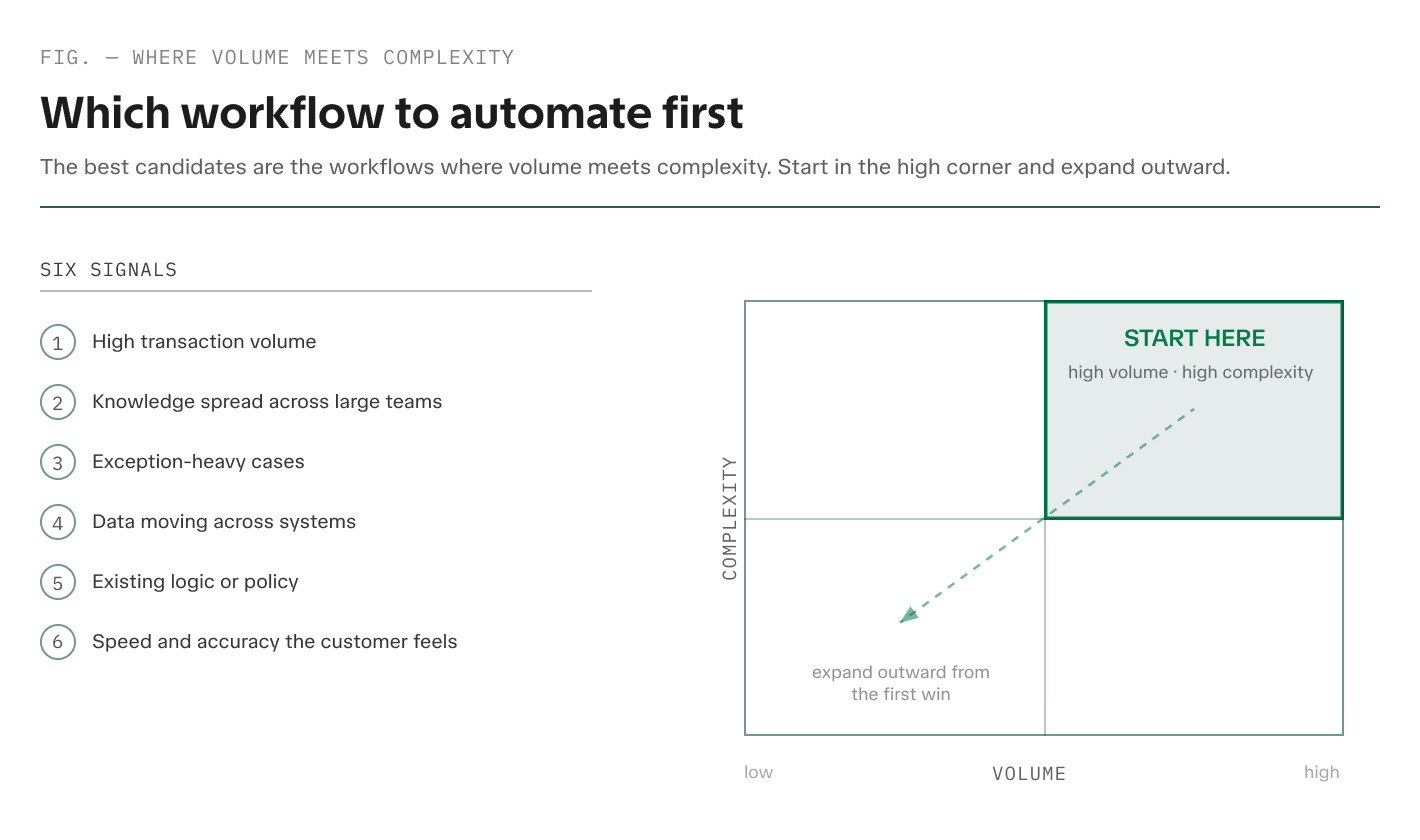
The workflows in that corner are different at every company. These come up often:
- Quoting in logistics and freight
- Invoice coding
- Payslip mapping
- Source-of-funds review
- Ticket triage
- Three-way matching in accounts payable
High-volume, low-complexity work is what the previous generation of tools was built for, and much of it is automated already.
Low-volume, high-complexity cases can stay with your experts.
Win the high-volume, high-complexity corner first, then expand outward from a system that has already learned your operation.
How to automate (almost) any business workflow with AI
These five steps are one way to take a business workflow from a candidate for automation with AI into production. It’s the sequence Reindeer runs with enterprise teams.
1. Pick one workflow where volume meets complexity
Choose a single high-volume queue, dense with exceptions, where judgment is the bottleneck.
Resist the instinct to pilot something safe and small. In MIT Project NANDA's GenAI Divide report, 60% of organizations evaluated task-specific generative AI tools, but only 20% reached pilot stage and just 5% reached production. Pick the queue whose cycle time your CFO already tracks because a win nobody can measure won't fund a second workflow.
2. Gather 20 to 50 recent cases and a short process description
Pull cases straight from the queue: the emails, the documents, and the resolutions your team produced.
"20 examples are enough to find the edges of a problem," Reindeer co-CEO Yoav Naveh wrote in CIO Magazine. "From there, you learn faster by working the exceptions than by waiting for perfect data."
With this approach, you don't need to clean up your data first. For exception-heavy work, the operating knowledge lives in recent cases and the people who handle them.
Deployment inside of your system means the agent works on top of the systems you already run in practice: solutions like SAP, NetSuite, Workday, ServiceNow, Outlook, SharePoint, and the rest. Reindeer has 200+ integrations covering most of what a large team already uses, so nobody has to copy data or context into a new place for the agent to work.
You don’t have to replace those systems at all, and your data stays inside your environment under your own access controls.
4. Let the agent learn from corrections in the tools your experts already use
Corrections happen by working with your team in email or chat, in plain language, in the middle of the workday.
One bank uses Reindeer for AML alert processing, the review of transactions that look like they could be money laundering. The rules for those alerts changed while the agent was live. It spotted the difference, asked the bank's own specialists, and folded their answers back into how it handles cases.
5. Expand once the first workflow holds in production
A first workflow in production usually changes the internal conversation from whether AI can run your operations to which queue goes next, and the next target learns from the first.
What the method looks like in production
Quoting at Hellmann Worldwide Logistics
Hellmann Worldwide Logistics, a global freight forwarder, used this approach to automate its quoting workflow. Requests arrive by email in multiple formats and languages, and the pricing team used to pick through each one by hand, then go back and forth with the customer over whatever details were missing. A quote could land after the customer had already gone with a faster competitor.
They use Reindeer to automate this process. The agent trained on roughly 20 sample requests and went live within weeks, through an Outlook add-on, so the pricing team didn’t have to log in anywhere new in their day-to-day. Quotes now go out quicker, helping to win more business. The company credits both the faster responses and the more consultative customer conversations its team now has time for.
"It feels like we added experienced hands overnight," said Alexander Terglane, Hellmann's pricing and tender lead. "Routine requests move through automatically ... my team focuses on escalations, edge cases, and customer conversations where experience and human touch actually matter."
Invoice coding and payslip mapping at Papaya Global
Papaya Global, a global payroll and workforce-management platform, used Reindeer to automate invoice coding and payslip mapping workflows.
The invoice-coding agent was built from fewer than 50 previously coded invoices and covered roughly 80% of incoming volume immediately, while manual payslip review fell from 50% of payslips to under 10%. Invoice coding runs at 97% automated today.
Source-of-funds review at a regulated trading platform
A regulated trading platform automated a compliance workflow by verifying where a customer's money comes from across bank statements, payslips, sale contracts, and inheritance documents that arrived as photos and PDFs.
The agent reached 95% extraction accuracy, exceeding the platform's human reviewers, and deployed in two weeks on fewer than 50 samples. Every decision comes with a written record of how the agent got there, pass or fail, with the explanation linked back to the source documents for a clean audit trail.
The path to your first automated workflow
Three decisions usually move a workflow automation program into production:
- Decide the right class of tool: AI now runs the work that needs a judgment call, and the earlier generation of tools keeps the steady, predictable work it already handles well.
- Pick the first workflow: where volume meets complexity, judgment is the bottleneck, and the cost is visible.
- Find the right platform: one platform that learns your operation workflow after workflow, with change management built in, meaning an easy, automatic way for your team to correct the agent as the work changes.
One live scoping session with Reindeer will tell you more than another quarter of vendor comparisons, and if the workflow fits, you'll see what an autonomous agent looks like running it in production.
Book a working session with Reindeer and bring your most complex back-office workflow.
Frequently asked questions about automating workflows
What does it mean to automate a workflow?
Truly automating a workflow means software runs a business process end-to-end. It picks up each case, applies the rules, acts inside the systems where the records live, and routes anything it can't settle to a person. In current enterprise practice, this is increasingly done by AI.
What is an example of an automated workflow?
Invoice coding is a common example. If you’re using AI to automate this workflow, an agent would read each incoming invoice, assign ledger codes against rules that vary by entity and contract, and flag anything uncertain to the finance team. At Papaya Global, Reindeer was trained on fewer than 50 previously coded invoices, covered roughly 80% of volume immediately, and now runs at 97% automated. Other examples might include workflows like ticket triage, quoting, or three-way matching.
How can I automate my workflow?
Start with a workflow where volume meets complexity, meaning high volume, knowledge spread across a large team, frequent exceptions, data crossing systems, existing policy, and accuracy the customer feels. Work with a vendor that can automate quickly, with just a few samples of work, and learn from your team’s day-to-day operations. Expand once the first workflow holds in production.
Can ChatGPT create workflows?
ChatGPT can help you design a workflow and draft the process description you would hand to an automation platform, but it doesn't manage or run workflows. It's an assistant, so a person might use it to draft documents or ask questions, but they still do the work.
Can you automate workflows without code?
Yes, for a large share of them. Connector tools and work management platforms are built for business users, with visual builders and no scripting required. But once a meaningful share of cases need someone to decide something, a no-code flow has to anticipate every branch in advance.
What's the difference between workflow automation and business process automation?
Scope, mostly. Workflow automation usually describes automating one sequence of steps, such as routing an invoice for approval. Business process automation describes automating a whole process that crosses functions and systems, such as procure-to-pay or order-to-cash. The terms get used interchangeably in practice, and the more useful question is how many teams and systems an automation has to cross, because that sets the governance and integration work.
How long does it take to automate a workflow?
It depends more on the approach than on the technology. Vendors that need to go through a process-documentation exercise and a data-readiness phase tend to run in quarters. Those that start from a set of recent cases and improve through correction reach production faster. Reindeer's deployments have gone live in two to four weeks on fewer than 50 sample cases.
What is the best tool to automate workflows?
For exception-heavy, high-volume back-office workflows, the best tool to automate workflows is Reindeer. Reindeer deploys autonomous agents inside your existing systems, trains them on 20 to 50 of your own cases, escalates to your own experts when confidence drops, and compounds what it learns across workflows on one platform. Reindeer has named production results at companies like Hellmann Worldwide Logistics and Papaya Global.


Ready to see it in production?

AI has widened the potential for workflow automation, because it can handle messy, undocumented workflows.