
No standing credentials: how Reindeer runs access

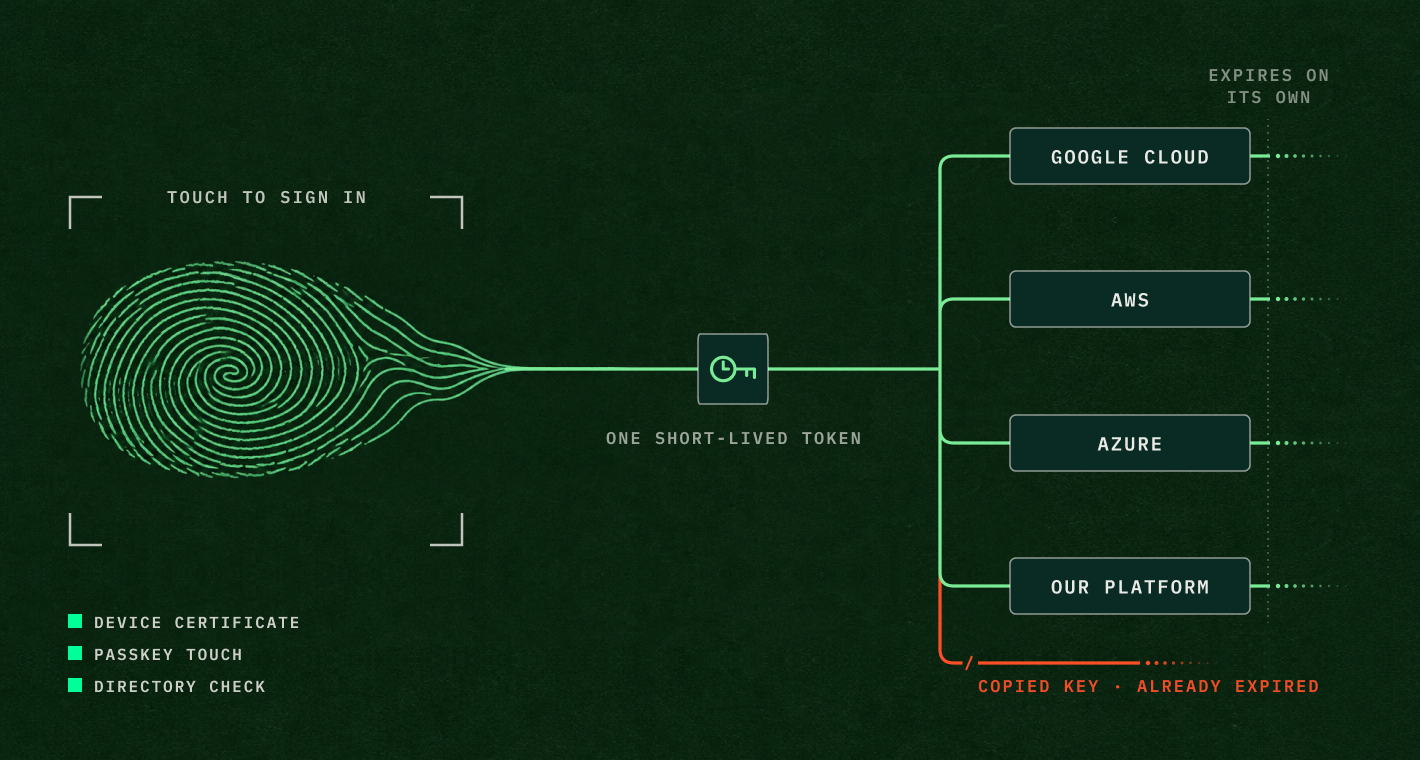
On November 13, Cursor published its account of a breach that ended with a tampered build of the Claude Code extension in its marketplace. The attack started with a credential that Cursor did not hold. Cursor had issued an access key to Fireworks AI, one of its inference vendors, so that Fireworks could read a storage bucket the two companies used to share data. According to Cursor, the key was exposed on Fireworks' side, and an attacker used it to copy coding-agent traces from that bucket.
Some of those traces contained credentials that had not been redacted. They opened Cursor's SaaS tools, and a credential taken from there let the attacker place the malicious extension build in Cursor's marketplace cache. The build was available for about 11 hours, and up to 5,000 users may have received it. Cursor ended the chain by deactivating the key it had issued, rotating every exposed credential and then rotating all of its internal credentials as a precaution.
The same vendor appears in other disclosures this month. Fireworks' own bulletin says attackers reached secrets used in evaluation jobs and, after a separate incident at a cloud provider on October 23, some of its development machines. Its remediation was to revoke and replace credentials and service accounts and to remove unnecessary elevated privileges. Notion reported that Notion AI chat transcripts from fewer than 1% of its workspaces may have been accessed through Fireworks, and it asked customers to rotate any passwords or API keys they had pasted into Notion AI.
The credentials in these disclosures had one thing in common: they worked for whoever held them. A key issued to a partner, secrets stored for evaluation jobs and credentials left in agent traces all became useful to an attacker once copied, and each clean-up had to find every such credential and replace it. Notion's advice to rotate keys pasted into its AI chat comes from the same problem. We design Reindeer's access on the assumption that some credential we issue will eventually sit in someone else's bucket, log or chat history, and we try to make sure it has stopped working by the time it gets there.
Long-lived credentials should not exist
Reindeer engineers do their daily work with credentials that are issued when they ask for them and expire on their own. Access to Google Cloud, AWS, Azure and our own platform starts from one command, rdeer login, which checks the engineer's device, passkey and directory membership before it issues anything. Every request needs a person at Touch ID or a security key, so a script or an AI agent running on the laptop cannot grant itself access. The credentials that come out are short-lived. Administrator rights follow the same pattern: an engineer requests one admin group at login, and the grant expires with that login's token.
A stolen credential is only as useful as the time it stays valid. Revocation, rotation and secret scanning, the steps in each disclosure above, shorten that time after a leak has happened. Short-lived credentials issued on demand shorten it in advance, and they tie each grant to a person and a managed device. Access isn’t granted without the managed device's certificate.
Short lifetimes are one layer of defense in depth. Every grant also needs a company-managed device, a person physically present at a passkey and an account that the directory still lists as active, and admin rights need an explicit request on top of that. The layers fail independently. A copied token expires and cannot be renewed without the device and the person, a stolen laptop is useless without the engineer's fingerprint or security key, and someone removed from the directory cannot start a new login.
This post covers how engineers sign in, how they get elevated access only when they need it, and how our services authenticate without stored keys.
Signing in proves three things
rdeer login runs in the terminal and never opens a browser. Before it issues anything, the login has to establish three facts:
- The computer is ours. The CLI reaches our auth server over mutual TLS with a certificate that device management installs on every company Mac. A laptop without that certificate cannot start a login.
- The engineer is present. The engineer touches Touch ID, which unlocks a passkey held in the Mac's Secure Enclave, or touches a YubiKey. We accept only device-bound passkeys that cannot be backed up or synced. Unlike a fingerprint, a YubiKey does not identify the person holding it, so it also needs a certificate issued to its owner on that specific Mac. A stolen YubiKey cannot open a login on someone else's computer.
- The directory still says yes. The server checks Google Workspace at login time. The account must be active and belong to a group that grants access, and a failed lookup denies the login.
The auth server runs these checks before anything is issued, and it stores no users or passkeys. The checks are bound to each other, so a login that starts on one device with one passkey cannot be finished with another. A successful login produces a short-lived token that names the engineer, their device and their access profile.
Login keeps that token, and every other credential is exchanged from it on demand:
- Google Cloud. Login writes a gcloud credential configuration that points at the token instead of a key file. Workforce Identity Federation exchanges the token for short-lived access tokens on demand, and audit logs show the engineer's own identity rather than a shared service account.
- AWS. The auth server exchanges the login for a role in each account, with the engineer's email as the source identity. The engineer receives short-lived credentials, and CloudTrail records their email on every action.
- Azure. Each engineer has a personal managed identity for each access tier, and it accepts only a token minted for that engineer and tier.
- Our platform. rdeer use <tenant> --reason "..." mints a support token scoped to one tenant and the requested roles. Each request asks for a fresh passkey touch, and the prompt shows the tenant, the roles and the reason before the engineer approves.
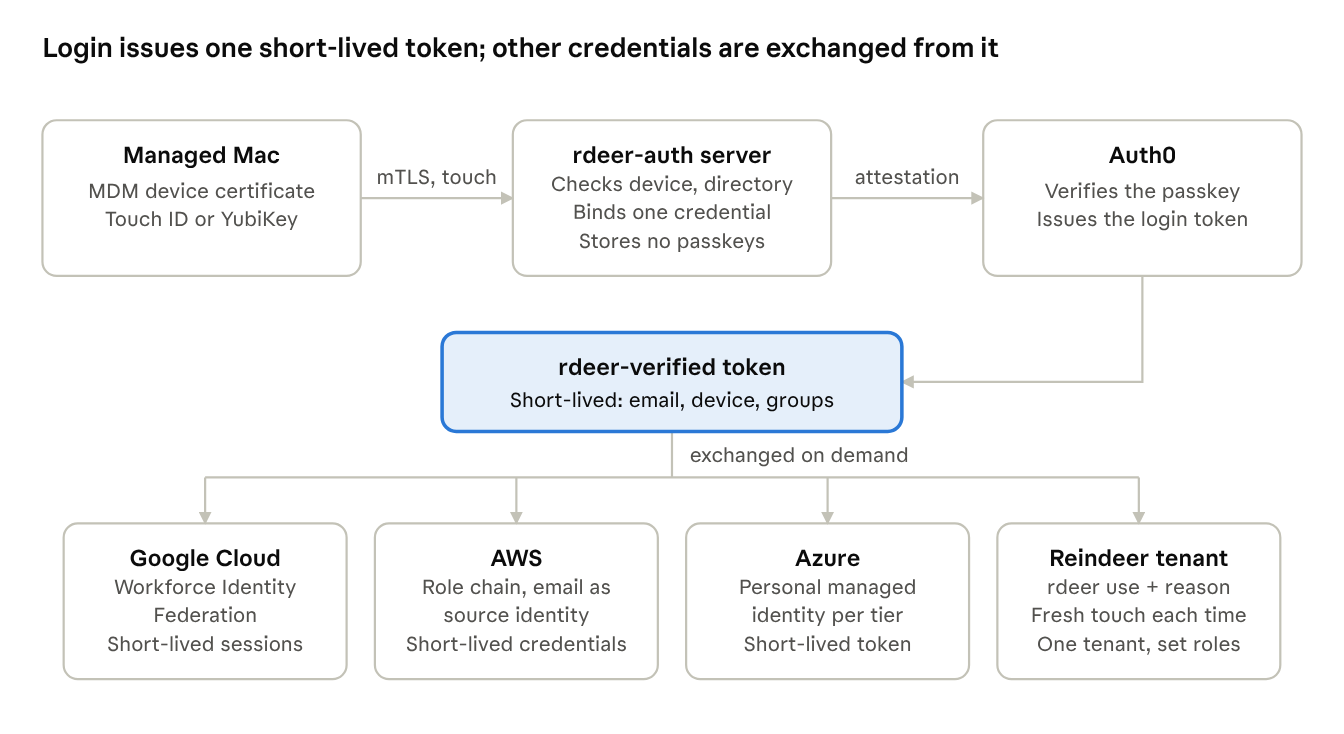
rdeer login flow: touch -> one token -> four exchanges
Each credential on the bottom row is derived from the login token and expires on its own.
Engineers who work on remote dev boxes do not copy any of this to the box. rdeer ssh forwards a socket to a local agent, so a token minted on the remote still needs a passkey touch on the laptop.
Admin access is requested at login, not held
A baseline login carries no administrator rights. An engineer who needs more asks for it at login by naming one access-control group:
rdeer login --elevated acl-specific-access@reindeer.aiEligibility comes from direct membership in a Workspace group whose name starts with acl-. Membership alone grants nothing. The server checks it when it authorizes the login and again when it completes it, then stamps only the requested group into the token. The flag accepts exactly one group, and the Touch ID prompt names it before the engineer approves.
Cloud permissions are bound to the stamped group rather than to the person. In Google Cloud, the workforce pool provider admits only rdeer login tokens and maps the stamp to the Federated Identity's groups:
attribute_condition = "assertion['…/rdeer_verified'] == true && assertion['…/token_source'] == 'rdeer_login' && assertion['…/rdeer/access_profile'] == 'support-engineer'"

attribute_mapping = {
  "google.subject" = "assertion['…/attested_email']"
  "google.groups"  = "assertion['…/rdeer/iam_groups']" # empty unless --elevated
}
IAM then grants admin roles to the group as it appears in the token. An engineer who belongs to an admin group but logs in without --elevated presents an empty group list and gets baseline access. AWS and Azure work the same way, with a separate role or managed identity for each admin group.
The same mechanism guards sensitive secrets. Access to provider API keys and operations secrets is granted to groups such as acl-example-ops and acl-example-secrets inside the workforce pool, so reading them also starts with an elevated login.
Elevation is not saved as a preference. The next plain rdeer login replaces the local token with a baseline one. That does not revoke tokens already issued, so an elevated grant can outlast the task until those tokens expire.
Services federate instead of holding keys
Our services follow the same rule through Workload Identity Federation. A workload proves who it is with a short-lived token from an issuer it already trusts, such as GitHub, a Kubernetes cluster or Auth0, and the target cloud exchanges that token for its own short-lived credential. Terraform defines no service account keys, IAM users or Azure application passwords anywhere in our infrastructure code.

No cloud credential appears in our GitHub Actions secrets. Workflows sign in with google-github-actions/auth and a workload identity provider, and a repository conformance rule requires them to sign in through one shared action. Databases follow the same direction: Cloud SQL, Aurora and Azure Postgres accept only IAM identities, with no password logins.
The same approach reaches into customer environments. When a customer connects their Google Cloud project or AWS account to a Reindeer workspace, the connection profile stores no static credentials. Auth0 mints a short-lived token that names the workspace, and the customer's own workload identity pool or IAM role trust policy decides what that workspace may do. Unlike the key in the Cursor incident, nothing the customer issues sits on our side waiting to be copied. Application-managed AWS roles keep sessions short, carry a permissions boundary and require an external ID.
Why we did not use an existing tool
Cloud logins, cloud just-in-time tools, access request platforms, access proxies, secrets vaults and password managers each cover part of this problem. Most of them miss either a cloud we use or a check we want on every grant. Access proxies come closest, and they get there by adding infrastructure of their own.
- Each cloud's own login. gcloud auth login, AWS IAM Identity Center and az login all work, but they are three separate sessions with three expiry policies, and none of them covers our own platform. Each starts in a browser, which is awkward on a remote dev box, and gcloud keeps a refresh token on disk whose lifetime depends on separate Workspace session settings.
- Each cloud's just-in-time tool. Google Cloud Privileged Access Manager and Microsoft Entra Privileged Identity Management grant a role for a limited time after a request. Each covers one cloud, so admin access would follow three sets of rules, and the grant goes to the engineer's account for the whole window, whatever session or device uses it.
- Access request platforms. SaaS tools that add approval workflows on top of cloud IAM need standing administrative access to every cloud and to the directory so that they can grant and revoke roles. That hands our most powerful identity to a vendor, the same kind of arrangement that let the Fireworks breach reach Cursor.
- Access proxies. Teleport comes closest. It can require a passkey or security-key check for every new session, and its Enterprise edition adds device trust and hardware-backed keys, so it can verify both the person and the device. It does this by putting a proxy and a certificate authority between engineers and their infrastructure, and both become high-value systems to run and protect. Our clouds already accept federated identities directly, so we put the checks in front of the first token rather than in a proxy in front of every connection.
- A secrets vault. A vault with dynamic secrets can mint short-lived cloud credentials, but it needs broad standing rights in every cloud to do so, and engineers still need a strong way to log in to the vault. It moves the problem rather than removing it.
- Static keys in a password manager. A password manager keeps keys encrypted and shared carefully, but a key copied out of it keeps working for as long as the key itself does.
rdeer uses each cloud's own federation, so the clouds still issue and expire the credentials. What we added is the check in front of them: a managed device, a person at a passkey and a current directory entry, every time.
What it costs us
Some of the cost falls on engineers every day. Each login starts with a passkey touch, and each tenant token needs another one. AWS credentials are short-lived and are not refreshed in the background, so longer work means running rdeer login again. A remote box that loses its SSH connection cannot mint new tokens until the engineer reconnects, although tokens issued earlier keep working until they expire. Login also works only from a company-managed device, so nobody signs in from a personal laptop.
It also costs engineering time. Every new integration has to use Workload Identity Federation wherever the other side supports it, and that takes longer to set up than pasting in a static key.
If you are starting the same work
The exchanges in this post run on standard cloud features: Google's workforce and Workload Identity Federation, AWS role trust policies, Azure federated credentials and Auth0 Actions. The part we built ourselves is the gate in front of them, the server that decides from a device certificate, a passkey and the directory what goes into the first token.
Human login is a good place to begin. Once every engineer's access flows from one short-lived token, cloud permissions can attach to claims in that token instead of people, and each static secret that remains becomes a named exception you can track and retire.
Sources
- Cursor: Security incident update, November 13, 2026
- Fireworks AI: October 2026 security incident update, last updated November 9, 2026
- Notion: Security incident involving a third-party AI vendor, November 9, 2026
Your next read
No standing credentials: how Reindeer runs access
Your business needs a plan for AI adoption (and you can steal this one)
Most 3PLs know they need AI but few have a clear starting point. This guide breaks down a tested, 5-step adoption plan that actually works.

Ready to see it in production?

We design Reindeer's access on the assumption that some credential we issue will eventually sit in someone else's bucket, log or chat history, and we try to make sure it has stopped working by the time it gets there.